
A teacher marks a register. The data lands in a spreadsheet, or a system no one else checks. Somewhere between "the child was marked absent" and "someone actually does something about it," hours go by. Then days. By the time a pattern shows up on anyone's radar, it's often already a habit and habits are much harder to reverse than a single missed morning.
That gap is the whole problem attendance automation exists to close. It isn't about replacing a paper register with a digital one schools have been doing that for years without changing much. It's about making sure that the moment a student misses class, the right person finds out, the right record gets kept, and the right response happens automatically in minutes, not weeks.
This guide focuses specifically on that automation layer: the alerts, reports, escalation workflows, and at-risk detection that turn raw attendance data into action. If you need the broader process for setting up and running an online attendance system end to end, our guide on how to manage school attendance online covers that in full. Here, we're going deeper on one part of it what to automate, how to configure it, and how to avoid the mistakes that make schools quietly turn their alerts off by the second term.
What "Attendance Automation" Actually Means
Digitizing attendance and automating it are not the same thing.
- Digitizing means a teacher taps a name on a tablet instead of writing it on paper. The data is now stored electronically.
- Automating means the system takes that data point and does something with it without a human having to remember to check, compile, or forward anything.
A school with digitized-but-not-automated attendance still has an office administrator pulling a report every Friday, manually spotting a student with five absences, and manually emailing a parent. A school with automated attendance has the system generate that alert the moment the fifth absence is logged, route it to the right person, and log the action taken automatically, every time, for every student.
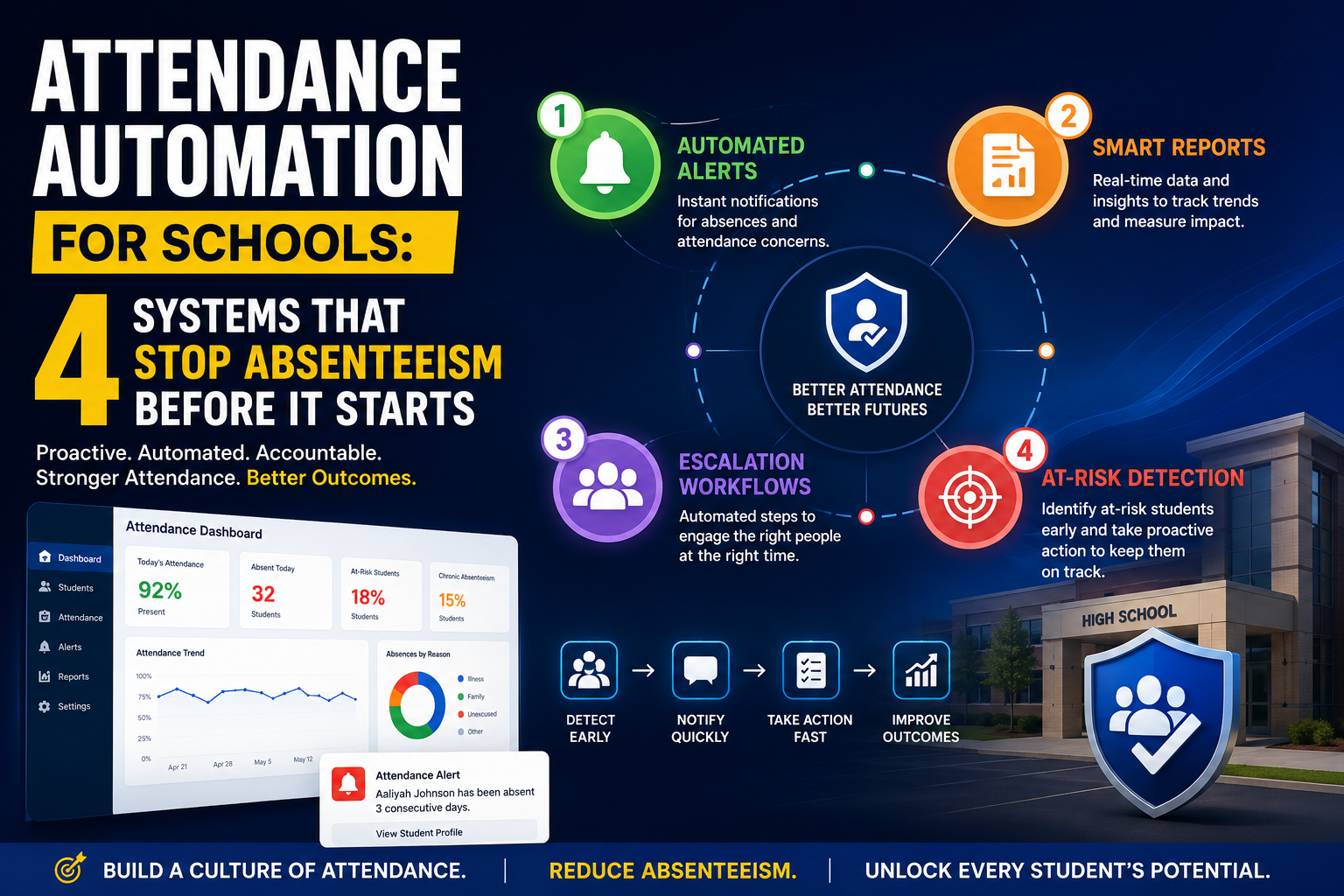
In practice, attendance automation for schools rests on four building blocks:
- Automated alerts instant notifications when an attendance event happens
- Automated reports scheduled, role-specific summaries delivered without anyone requesting them
- Automated escalation rules that route a case to a more senior person as severity increases
- At-risk attendance detection pattern recognition that flags a student before they cross a compliance threshold
Most attendance software offers pieces of this. Very few schools configure all four well, which is usually where the value gets left on the table.
Why This Matters More Than It Used To
Attendance isn't just an administrative metric it's one of the most reliable predictors of academic outcomes available to a school. A large cross-country study covering more than 200,000 adolescents across 71 low, middle, and high-income countries found a population-weighted chronic absenteeism rate of over 11%, with factors like food insecurity, peer conflict, and lack of family support consistently associated with higher risk. In other words: absenteeism isn't a niche problem tied to one school system or region it's a global pattern with real, identifiable warning signs long before it becomes a crisis.
A few implications follow directly from that:
- Manual monitoring doesn't scale. At typical chronic-absenteeism rates, even a mid-sized school can have well over a hundred students who need individualized follow-up in a single year a caseload beyond what one attendance officer or counselor can track by memory and spreadsheet.
- Early intervention is the lever that works. The pattern shows up consistently in the research: contacting a family after two or three absences changes behavior far more effectively than contacting them after twenty, once absence has hardened into habit.
- The warning signs are identifiable, not random. Absenteeism correlates with specific, trackable factors attendance dips clustering around certain days, drops that coincide with other engagement signals, or patterns that repeat across siblings or peer groups. Those are exactly the signals a rules-based system can be built to catch.
- Accountability pressure isn't going away. Funding formulas, safeguarding obligations, and regulator reporting in most education systems depend on attendance data being accurate and auditable not reconstructed from memory at the end of term.
Automation is the only realistic way to act on all of this consistently, across every student, every day, without adding headcount.
The Four Building Blocks of Attendance Automation
1. Automated Alerts
Alerts are the most visible piece of attendance automation, and the easiest to get wrong. Done well, an alert reaches the right person within minutes and prompts a useful action. Done poorly, it becomes noise that parents mute and staff ignore.
Core alert types worth automating:
| Trigger | Recipient | Typical channel | Timing |
|---|---|---|---|
| Student marked absent, first period | Parent/guardian | SMS + app push | Within 15–30 minutes |
| Student late (unexplained) | Parent/guardian | App notification | Same day |
| Third unexplained absence in a rolling 30 days | Attendance officer / head of year | Dashboard flag + email | Immediate |
| Absence for a student with a known medical plan | Pastoral/SEN lead | Internal note (no parent alert) | Immediate |
| Register not submitted by a teacher | Admin office | Internal alert | 15 minutes after period start |
| Attendance drops below 90% year-to-date | Parent/guardian + attendance team | Email summary | Weekly |
Design principles that keep alerts useful instead of exhausting:
- Match urgency to severity. A same-day absence alert can be automatic and low-friction. A fourth escalation-tier absence should feel different a phone call flag, not another text.
- Let thresholds vary by context. A Year 11 student with a documented anxiety history and a Year 7 student in their first week need different trigger points, even inside the same system. Build this into your rules, not into individual staff members' memory.
- Give an easy override path. If a parent already knows their child is on an approved trip, they need a one-tap way to acknowledge the alert without it counting as a false alarm in your data.
- Batch what doesn't need to be instant. Weekly summaries, term reports, and trend digests should be scheduled, not fired in real time see automated reports below.
2. Automated Reports
Reporting automation removes the recurring task of someone manually compiling attendance data into a spreadsheet or slide deck. The goal is that no one in the building should ever have to ask for an attendance report it should already be in their inbox.
Reports worth automating, by audience:
- Teachers: a daily register-completion summary for their own classes, so gaps get caught before end of day.
- Heads of year / pastoral leads: a weekly cohort report showing students below 90%, students with a Monday/Friday pattern, and any new escalation-tier cases.
- School leadership: a monthly whole-school trend report segmented by year group, class, and demographic group, benchmarked against the prior term and prior year.
- Compliance/regulatory: term-end or annual reports formatted for whatever your regulator requires state reporting, inspection frameworks, or funding audits generated on a schedule so nothing is assembled under deadline pressure.
- District/trust level: a rolled-up dashboard across sites, useful only if your platform can federate data while still giving each school its own view.
The report itself matters less than the delivery mechanic: scheduled generation, automatic distribution to the right role, and a consistent format that people learn to read quickly. A beautifully designed report that someone has to remember to run every Friday is not automation it's just a nicer manual task.
3. Automated Escalation
Escalation is the piece most attendance platforms handle worst, because it requires school-specific policy logic, not just software features. Alerts tell someone something happened. Escalation makes sure the right someone eventually knows, with increasing seniority as the pattern gets more serious.
A workable escalation ladder generally has four tiers:
| Tier | Trigger example | Owner | Action |
|---|---|---|---|
| 1 — Automatic notice | 1st unexplained absence | System → parent | Automated SMS/email, no staff time required |
| 2 — First check-in | 2–3 unexplained absences in 4 weeks | Class teacher or form tutor | Brief conversation with student, note logged |
| 3 — Formal follow-up | Attendance below 90% for the term, or 3+ unexplained absences | Attendance officer / head of year | Parent phone call, documented outreach, agreed plan |
| 4 — Escalated intervention | Pattern persists after Tier 3, or absence exceeds regulatory threshold | Designated safeguarding lead / SLT / external welfare service | Formal meeting, referral, or statutory notice as required |
The point of automating this isn't to remove human judgment it's to guarantee the handoff happens. A student shouldn't fall through the cracks because the teacher who noticed the pattern forgot to mention it to the head of year. Configure the system to auto-create a case, timestamp every action taken, and auto-notify the next tier if no action is logged within a set window (for example, 48 hours). That accountability trail also matters for safeguarding audits and regulator reviews.
4. At-Risk Attendance Detection
This is the piece that separates basic automation from genuinely predictive attendance management. Instead of waiting for a student to cross a threshold 10% absence, three unexplained absences, whatever your policy defines at-risk detection looks for the trajectory that predicts they will.
What a useful at-risk model actually looks at:
- Early trend, not lagging totals. A student who misses two days in the first three weeks of term is a stronger early signal than a student with two absences spread across a full year.
- Day-of-week patterns. Persistent Monday or Friday absences often point to a different root cause than random spread-out absences.
- Cross-signal correlation. Attendance dips that coincide with a drop in behavior points, assignment submissions, or nurse visits are more actionable together than any single signal alone.
- Cohort-relative deviation. A student trending 5 percentage points below their own historical average is often a better flag than an absolute percentage that doesn't account for their baseline.
How to operationalize it without over-trusting the model:
- Set the system to flag, not to act unilaterally. A predictive flag should create a case for a human to review, not trigger a formal letter home automatically.
- Assign a named owner (attendance officer, counselor, or pastoral lead) for reviewing flags weekly an unreviewed flag is a wasted flag.
- Track false positives. If a flagged pattern turns out to be a documented medical leave or an approved absence, feed that back so thresholds improve over time.
- Segment your view. Look at flags by year group, demographic group, and teacher/class the same predictive threshold rarely fits every context equally well.
This is also where automation earns the most goodwill from staff: instead of an overworked attendance officer manually scanning spreadsheets for patterns, they open a short, pre-filtered list of students worth a conversation this week.
How to Set Up Attendance Automation, Step by Step
- Map your current manual touchpoints. Before configuring anything, list every place a human currently checks, compiles, or forwards attendance data by hand. Each one is a candidate for automation.
- Define your policy thresholds first, software second. Decide what counts as an unexplained absence, what triggers each escalation tier, and what your at-risk definition is (most schools start from the 10%/18-day chronic absenteeism benchmark and adjust). Software should encode your policy, not dictate it.
- Configure alerts before reports before escalation. Alerts are the fastest win and the easiest to validate. Get those right, then layer in scheduled reporting, then build escalation logic once you trust the underlying data.
- Pilot with one cohort or campus. Run the full alert-report-escalation loop with a single year group for two to four weeks before rolling out school-wide. This surfaces threshold problems (too many alerts, too few) while the blast radius is small.
- Assign human owners to every automated output. An alert, report, or flag with no named owner will eventually be ignored. Write the owner into the workflow, not just the notification.
- Review thresholds every term. Notification rules that made sense in September often need adjusting by January new students, changed circumstances, or alert fatigue all shift what "right" looks like.
Choosing Software for Attendance Automation: What to Check For
Beyond the general attendance-software criteria (SIS/LMS integration, data privacy compliance, offline capability covered in depth in our full attendance management guide), automation-specific capability is worth testing directly rather than taking on faith:
- Can you set different alert thresholds per student or cohort, not just one global rule?
- Does escalation create an auditable case with timestamps, or is it just a notification that disappears once read?
- Can reports be scheduled and routed by role without someone manually running and forwarding them?
- Is the at-risk model transparent? Ask the vendor what data points feed the prediction and whether you can adjust sensitivity a black-box score you can't tune or explain to a parent is a liability, not a feature.
- What happens when a rule misfires? Every vendor demo shows the happy path. Ask specifically how false-positive alerts get corrected and whether that correction feeds back into the model.
- Can staff acknowledge or close a case from a phone, not just a desktop dashboard? Front-office and pastoral staff are rarely sitting at a desk when a case needs action.
Common Pitfalls When Automating Attendance
- Alert fatigue. If every absence including pre-approved ones generates the same urgent-feeling notification, parents and staff both start ignoring the channel. Differentiate by severity from day one.
- Escalating too fast or too slow. Thresholds copied from another school's policy rarely fit your population. Start conservative, measure, and adjust rather than guessing.
- Treating predictive flags as verdicts. An at-risk flag is a prompt for a conversation, not a label to put in a student's file. Human review stays essential.
- Automating the notification but not the follow-up. An alert that goes out with no owner responsible for the next step just moves the bottleneck instead of removing it.
- Ignoring data quality at the source. No amount of automation logic fixes attendance data that's wrong at entry a mis-imported roster or a teacher who submits registers hours late will corrupt every alert, report, and prediction downstream.
Measuring ROI on Attendance Automation
Automation is easiest to justify with numbers your leadership team already tracks. A simple framework:
- Staff time saved: (minutes spent per week on manual attendance follow-up and reporting) × (number of staff doing it) × (weeks per term). Compare before and after automation.
- Notification speed: average time between an absence being logged and a parent being notified this should move from hours or days to minutes.
- Intervention lead time: average number of absences before first contact with a family. The earlier this number gets, the more the research on early intervention works in your favor.
- Chronic absenteeism rate, term over term: the ultimate outcome metric, though it moves slowly and is affected by many factors beyond software.
- Register completion rate: the percentage of registers submitted on time a leading indicator that your automation is trusted and used, since staff who don't trust a system's follow-through tend to disengage from entering data into it.
Conclusion
Attendance automation isn't a single feature to turn on it's four interlocking systems (alerts, reports, escalation, and at-risk detection) that only deliver value when they're configured against your school's actual policy and reviewed regularly. The technology does the repetitive, time-sensitive work; your staff still make the judgment calls that matter.
If you're building this out for the first time, start with alerts, get the thresholds right, and layer in reporting and escalation once the data underneath is solid. For the complete process from auditing your current attendance workflow through staff training and parent communication see our full guide on how to manage school attendance online.
Ready to see automated alerts, reports, escalation, and at-risk detection running on your own attendance data? Get started with Clast or explore Clast for Schools.