
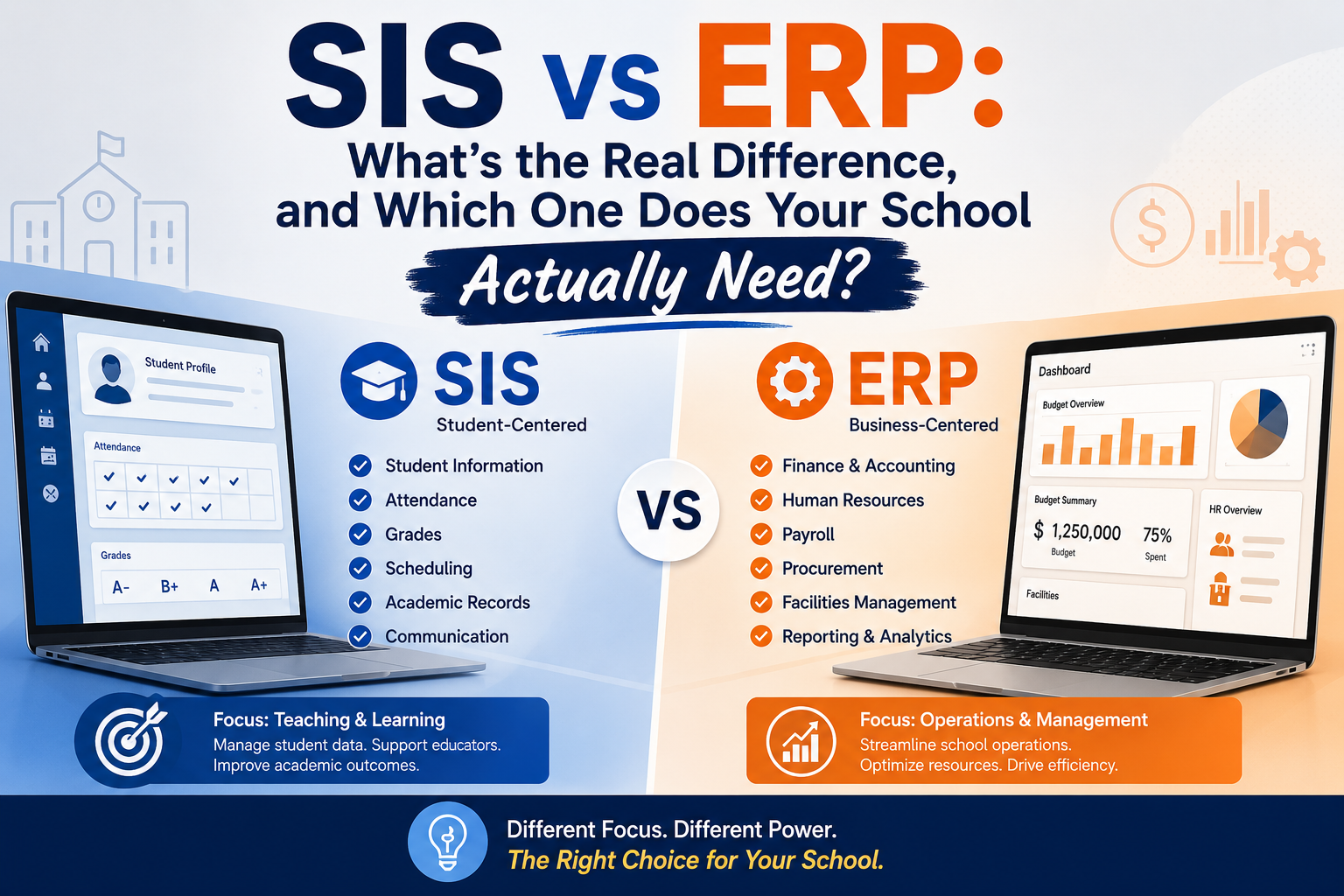
If you've spent any time shopping for school or university software, you've probably noticed that "SIS" and "ERP" get thrown around like they mean the same thing. Sometimes a vendor calls their product an SIS. Sometimes the exact same feature set gets sold as an ERP. Sometimes it's both, bundled with a CRM and an LMS for good measure, and nobody bothers to explain where one system ends and the next one begins.
That confusion isn't just annoying it's expensive. Pick a strict SIS when you actually needed a full ERP, and you'll be back on Tally or spreadsheets for payroll within a year. Pick a bloated ERP when a focused SIS would have done the job, and you'll pay for modules nobody touches while your actual pain point usually academic record-keeping never gets properly solved.
This guide breaks down exactly what each system does, where they overlap, how the two adjacent categories (CRM and LMS) fit in, what each one actually costs, and how to make the call for your institution whether that's a 400-student K-12 school or a university running multiple campuses.
The Short Answer
- A Student Information System (SIS) is the academic system of record. It owns student profiles, enrollment, attendance, grades, transcripts, and report cards. It answers one question: who is enrolled, and how are they doing academically?
- An ERP (Enterprise Resource Planning system) is the operational and financial backbone. It covers everything an SIS does, plus tuition billing, payroll, general ledger, procurement, HR, and often communication and facilities. It answers a broader question: how does the whole institution run, day to day?
Every ERP effectively contains SIS-like functionality. Not every SIS contains ERP functionality. That asymmetry is the whole reason the two terms get confused and it's the first thing to understand before you evaluate any vendor.
SIS vs ERP: Side-by-Side Comparison
| SIS | ERP | |
|---|---|---|
| Core question it answers | Who is enrolled, and how are they doing? | How does the institution run and pay for itself? |
| System of record for | Student profiles, enrollment, attendance, grades, transcripts | Finance, payroll, HR, procurement, budgeting |
| Primary users | Registrars, teachers, academic advisors | CFO, business office, HR, senior administration |
| Typical modules | Admissions-to-enrollment records, gradebook, report cards, scheduling, attendance | General ledger, accounts payable/receivable, tuition billing, financial aid, payroll, budgeting |
| Also usually includes | Parent/student portals | SIS-equivalent functionality, plus fees and payroll |
| Who buys it first | Academic leadership, registrar's office | CFO or business office, sometimes bundled with SIS purchase |
| Typical annual cost (mid-size institution) | Lower — often $3–$15 per student/year for a standalone SIS | Higher — full-suite platforms often run $10,000–$150,000+/year depending on institution size and modules |
If that comparison feels oddly lopsided like the ERP column just swallows the SIS column that's not an error. It's the actual relationship between the two categories, and it's worth sitting with for a second before you start evaluating vendors.
What an SIS Actually Manages
Strip away the marketing and a Student Information System is responsible for one thing: the academic and demographic record of every student, from admission to graduation.
Concretely, that means:
- Student profiles demographics, contact details, guardian/parent links, admission number, academic history
- Enrollment and class assignment sorting students into grades, sections, or course sections; promotion at year-end
- Attendance daily and period-level attendance, leave records, absence patterns
- Gradebook and assessments marks entry, grading scales, GPA/CGPA calculation
- Report cards and transcripts board- or accreditation-compliant formats, historical records
- Scheduling class timetables, exam schedules, hall tickets
- Compliance reporting state or regulatory reporting where required
Most public-sector and government SIS deployments stop exactly here, by design finance and HR are handled by a separate, often centrally-mandated system.
What an ERP Adds on Top
An ERP wraps the SIS layer in the operational machinery that actually keeps an institution running day to day. The modules that separate an ERP from a standalone SIS typically include:
- Finance and accounting general ledger, accounts payable/receivable, budgeting, procurement
- Tuition billing and financial aid fee structures, payment plans, scholarships, online payment gateways, dues tracking
- Payroll and HR staff salary structures, benefits, attendance-linked deductions, HR records
- Facilities and asset management inventory, maintenance, room/resource scheduling
- Institutional reporting board-ready dashboards spanning finance, enrollment, and operations
- Communication bulk messaging to parents/students across email, SMS, and increasingly WhatsApp
- Ancillary services transport, cafeteria/canteen, library, extracurricular billing
When a vendor says "ERP," they almost always mean SIS plus some subset of the list above. The exact mix varies enormously between products which is exactly why two ERP vendors can be solving completely different problems for completely different institutions, even while using identical marketing language.
Where SIS, ERP, CRM, and LMS Actually Fit Together
If you've researched this topic at all, you've likely also run into CRM and LMS two more acronyms that get pulled into the same conversation. They're not competitors to SIS or ERP; they cover adjacent ground that neither system is built for.
| System | What it owns | Who lives in it daily |
|---|---|---|
| SIS | The enrolled student's academic record | Registrar, teachers, academic advisors |
| ERP | Institutional finance, HR, and operations | CFO, business office, HR |
| CRM | Everyone who isn't yet an enrolled student — inquiries, applicants, and after they leave — alumni and donors | Admissions team, advancement/development office |
| LMS | The actual teaching and learning experience — course content, assignments, discussion, online assessment | Faculty and students, in real time |
Here's the relationship that most single-topic guides miss: an SIS and an ERP both deal with people who are currently part of the institution. A CRM exists because the moment before someone enrolls (a prospective family, an applicant) and the moment after they leave (an alum, a donor) fall outside what either system is designed to track. An LMS, meanwhile, sits entirely inside the teaching moment it's not a system of record at all, more a system of engagement.
Put together as a lifecycle: a prospect enters the CRM during admissions → becomes a student in the SIS at enrollment → generates a tuition charge in the ERP → attends classes tracked in the LMS → and eventually re-enters the CRM as an alum. Institutions that only buy one or two of these systems usually discover the gap the hard way a dropped student who still has LMS access, or a financial aid decision the admissions team never sees.
Why the Line Is Getting Blurry in 2026
A strict SIS-vs-ERP distinction made more sense five years ago than it does today, for three specific reasons:
1. Cloud-native platforms ship bundled by default. Modern school software built in the last few years tends to launch with SIS, billing, and communication together as the baseline, not as an upsell. The engineering cost of artificially separating them is no longer worth it to most vendors.
2. Institutions are actively consolidating vendors. Nobody wants five logins for a fees vendor, a website vendor, a messaging vendor, and a payroll vendor. The market responded by bundling more into single platforms which is part of why "SIS" and "ERP" increasingly describe the same product with different labels.
3. AI features need data from both sides of the fence. A useful AI assistant that can answer "is my child's fee paid" or "what's the exam timetable" needs simultaneous access to academic data (SIS) and financial data (ERP). If those live in separate systems without integration, the assistant either can't answer the question or gives an unreliable answer. That's pushing vendors toward unified platforms rather than clean category separation.
The practical upshot: in 2026, "do I need an SIS or an ERP" is often the wrong first question. The better first question is "do I want one connected platform, or several specialized ones stitched together?"
How to Decide: A Practical Framework
Choose a standalone SIS if:
- Your finance, payroll, and HR are already handled by an external or centrally-mandated system (common for public/government schools)
- You just need to close an academic record-keeping gap without touching money or staff systems
- You want a lightweight, focused tool and don't need billing, HR, or a parent-facing app bundled in
Choose a full ERP if:
- You're running day-to-day operations end-to-end and are tired of reconciling data across five disconnected vendors
- You want one login for staff, one app for parents, and one source of truth for both academic and financial data
- You're a private institution where tuition billing, payroll, and communication all need to work together without custom integration work
For higher education specifically:
Universities almost always end up needing all three of SIS, ERP, and CRM usually in that rough order of adoption. The real decision isn't whether to have each one, but whether to run them as separate best-of-breed systems connected by integrations, or as a single unified platform. Both are legitimate strategies; EDUCAUSE and Gartner both note that a "best-of-breed, connected" approach can work well if the integration layer is properly resourced the risk is treating integration as an afterthought rather than a first-class part of the project.
What Each Category Actually Costs
Pricing is the piece most comparison articles skip entirely, so here's a realistic range based on current market positioning:
| Typical range | What drives the price | |
|---|---|---|
| Standalone SIS (K-12) | $2–$15 per student, per year | Board/curriculum configurability, mobile access, parent portal depth |
| Full school ERP (K-12) | Roughly $3,000–$6,000/month for a 500-student private school | Number of bundled modules (fees, payroll, communication, transport), payment gateway integration, per-message communication costs |
| University SIS/ERP (mid-size institution) | $50,000–$300,000+/year | Student headcount, number of campuses, degree/program complexity, whether HR and finance are included |
| CRM (admissions/advancement) | Often licensed per user or per contact record; ranges widely from a few hundred to several thousand dollars/month | Number of admissions staff, marketing automation features, alumni/donor module inclusion |
A pattern worth watching for regardless of segment: a headline price that looks complete but turns out to exclude fee collection, the parent app, or per-message communication costs as separate add-ons. By the time everything you actually need is switched on, the real cost is often 2–4x the number you were quoted. Always ask for the fully-loaded price, not the entry-tier number.
The Buyer's Checklist: What Actually Separates Good Systems from Cosmetic Ones
Whichever category you're evaluating, these are the details that matter more than the feature list on the sales page:
- Real online payment processing, not just "we generate a payment link" with automatic reconciliation against the ledger
- Role-based access control granular enough that a teacher can't see another class's grades and an accountant can't edit attendance
- Data export on demand. You should be able to pull your full dataset as CSV/Excel at any time no vendor lock-in through data hostage-taking
- Configurable to your grading/accreditation standard without a custom development project
- Multi-channel communication (email, SMS, WhatsApp/messaging) billed at actual provider rates, not marked up 2–4x
- A stated integration strategy if you're buying more than one system ask specifically how SIS, ERP, and CRM (or LMS) will share data, and what breaks first when one system is upgraded
- Mobile-usable for staff, not just administrators a teacher taking attendance on a phone is a daily reality, not an edge case
A blunt but effective interview question for any vendor demo: "Show me what the principal or provost sees at 9 a.m. on a Monday." A genuinely integrated system surfaces yesterday's collections, today's absentees, this week's exam schedule, and outstanding fees in one view. A system that's really just an SIS with a billing module bolted on will show you attendance and marks and not much else.
Common Mistakes When Choosing Between SIS and ERP
- Buying ERP-level scope to solve an SIS-level problem. If your actual pain point is that report cards take three days to generate, a full financial suite won't fix that and you'll be paying for payroll and procurement modules nobody opens.
- Assuming "ERP" means the same thing across vendors. One vendor's ERP might mean SIS + fees. Another's might mean SIS + fees + payroll + HR + facilities. Always ask for the exact module list in writing before comparing price.
- Treating integration as a later problem. If you're running SIS, ERP, and CRM as separate systems, the integration plan needs to exist before go-live, not after the first data mismatch surfaces.
- Underestimating change management. The technology is rarely the reason implementations fail. Staff adoption, training, and a realistic timeline matter as much as the feature comparison.
- Ignoring what happens to legacy data. Migrating years of transcripts, financial records, and attendance history is a bigger project than most timelines allow for build in real time for data validation and reconciliation, not just data transfer.
Conclusion
An SIS is the academic record. An ERP is the operational engine that the academic record plugs into. Neither one is inherently "better" they solve different problems, and most growing institutions eventually need both, whether bundled into one platform or connected as separate best-of-breed systems.
Before you sit through another vendor demo, get clear on three things: which specific problem you're actually trying to solve today, what your realistic budget looks like once every module you need is switched on, and whether you're optimizing for one unified login or specialized depth in each system. Get those three answers first, and the SIS-vs-ERP question mostly answers itself.