

If you're drowning in spreadsheets, chasing unpaid fees, and manually copying student data between systems, you already know the problem this guide solves. Here's everything you need to understand about a modern student management system: what it actually does, how its database is structured, which features matter, what it costs in 2026, and how to choose one without getting burned.
What Is a Student Management System?
Quick answer
A student management system (SMS) is software that keeps student records and the work around them in one place: admissions, enrollment, attendance, assessment and grades, timetables, fees, and communication with parents and students. It is often used interchangeably with student information system (SIS). The practical difference is scope. An SIS stores and retrieves records. A modern SMS also automates the workflows built on those records.
A student management system is software that centralizes everything an institution needs to know and do about its students. Each student has one record, and every authorized person sees the same current information: administrators, teachers, finance staff, registrars, parents, and students.
Without one, the same facts live in several places. Attendance is on paper, fees are in a spreadsheet, grades are in a gradebook, and contact details are in someone's inbox. When a parent changes a phone number, nobody is sure which copy is right.
A student management system typically handles:
- Admissions and enrollment: applications, documents, waitlists, and the move from applicant to enrolled student
- Student records: profiles, guardians, medical and emergency information
- Attendance: daily or per-session registers and absence alerts
- Academics: classes, timetables, assessments, grades, report cards or transcripts
- Fees and billing: invoices, payment plans, online payments, receivables
- Communication: announcements, messaging, parent and student portals
- Reporting: attendance, performance, enrollment, and financial dashboards
- Access control: role-based permissions and audit trails
It is used by primary and secondary schools, language academies, vocational institutes, colleges, and universities. Needs differ a lot by institution type, which is why the selection section starts with your institution, not a feature list.
A short history from paper registers to cloud platforms
Schools have always collected student data historically as paper registers, filing cabinets, and end-of-year reports. The first digital student record systems appeared in the 1970s as universities adopted mainframes. By the 2000s, web-based student information systems had become standard in higher education. Today's platforms are cloud-hosted and mobile-accessible, integrate with dozens of other tools, and increasingly use AI for early-intervention alerts and predictive analytics. We cover this evolution in more depth in our guide to education management systems.
SMS vs SIS vs LMS vs school ERP
These terms overlap, and vendors use them loosely. Here is the working distinction.
| System | Full name | Core job | Who uses it most |
|---|---|---|---|
| SMS | Student Management System | Runs the school's operations enrollment, attendance, billing, communication, records | Administrators, finance, registrars |
| SIS | Student Information System | Stores and retrieves student records — the "digital filing cabinet" | Registrars, compliance teams |
| LMS | Learning Management System | Delivers course content, assignments, quizzes, and online learning | Teachers, students |
| School / campus ERP | Enterprise resource planning | Adds HR, payroll, finance, and facilities around student management | Central administration, multi-campus groups |
A simple way to hold it: the LMS is the classroom, the SIS is the filing cabinet, the SMS is the office that keeps everything moving, and the ERP is the whole organization's back office.
Many products bundle SIS and SMS functions and add LMS or ERP modules. When a vendor says "SIS," ask whether billing, enrollment workflows, and parent communication are included or sold separately. For more detail, see our guides to SIS vs ERP and the student information system.
Searching for a "student information management system"? That is the same family of software. If your main need is official records and compliance reporting, the SIS guide above is the better starting point. If you also need billing, enrollment workflows, and communication, keep reading.
Core modules of a student management system
Not every institution needs every module. Use this table to separate must-haves from nice-to-haves.
| Module | What it does | Why it matters |
|---|---|---|
| Student profiles | One record per student: personal details, guardians, medical notes, documents | Removes duplicate and conflicting records |
| Admissions and enrollment | Online applications, document upload, waitlists, offers, conversion to enrolled student | No re-typing when an applicant becomes a student |
| Attendance | Registers by class or session, absence alerts, trend reports | Early warning on chronic absence |
| Assessment and grades | Gradebooks, assessment types, report cards or transcripts | Consistent grading and fast reporting |
| Timetabling | Schedules, room allocation, clash detection, exam timetables | Fewer manual conflicts |
| Fee management | Invoices, installments, online payment, reminders, receipts | Faster collection and cleaner finance records |
| Communication | Announcements, messaging, notifications, parent and student portals | Fewer routine calls to the front office |
| Reporting and analytics | Dashboards and exports for leadership, boards, and regulators | Decisions based on current data |
| Roles and security | Permissions, access logs, audit trails | Privacy and accountability |
| Integrations and API | Connections to LMS, accounting, payroll, identity systems | Avoids double entry |
Features worth asking about in 2026
- At-risk alerts: flags based on attendance, grades, or engagement patterns so staff can step in early. Ask how flags are calculated and whether thresholds can be adjusted.
- Mobile access: a real app or a genuinely usable mobile web experience for parents, students, and staff.
- Self-service portals: students and parents check timetables, grades, and fee balances without contacting the office. See our guide to parent portal software.
- Document management: consent forms, certificates, and records stored and signed digitally.
- Multi-campus support: one system, separate permissions and reporting per campus.
- Student lifecycle tracking: inquiry, admission, enrollment, progress, graduation, and alumni in one continuous record.
- AI assistance: summaries, drafting, and search over your own records. Ask where data is processed and how it is governed. Our AI transparency page explains our approach, and our guide to AI in school administration covers what works and what doesn't.
Fee handling often has the clearest payoff, so evaluate it separately. See fee management software for schools.
Assessment and grading in a student management system
A student assessment management system is the part of an SMS that records how students are evaluated and turns scores into reports. Look for:
- Configurable assessment types: quizzes, tests, assignments, projects, and exams, each with its own weighting
- Grading scales: percentages, letter grades, grade points, or custom scales per program
- Gradebooks teachers can use quickly, including on a phone
- Report cards and transcripts generated from the same data, with approval steps before release
- Performance analytics: class and cohort trends, subject comparisons, and students falling behind
- Audit trails: who changed a grade, when, and why
Ask vendors to show a teacher entering scores, a registrar correcting one, and a parent viewing the result. If those three flows are clumsy, the module will not be used.
How a Student Management System's Database Is Structured
You do not need to be a developer to buy an SMS. But knowing how the data is organized helps you ask better questions about integrations, migration, and exports. It is also the starting point if you are designing a system or working on a student management system project.
Most systems use a relational database: separate tables for each kind of thing, linked by IDs.
| Table (entity) | Typical fields | Links to |
|---|---|---|
| Students | student_id, name, date of birth, contact details, status | Guardians, enrollments, attendance, grades, invoices |
| Guardians | guardian_id, name, relationship, contact details | Students |
| Programs / courses | course_id, title, credits or hours, department | Sections, grades |
| Classes / sections | section_id, course_id, teacher_id, term, room | Enrollments, attendance, timetable |
| Enrollments | enrollment_id, student_id, section_id or program_id, academic year | Students, sections |
| Attendance | attendance_id, student_id, section_id, date, status | Students, sections |
| Assessments / grades | assessment_id, student_id, course_id, type, score | Students, courses |
| Fees / invoices / payments | invoice_id, student_id, term, amount, due date, status | Students |
| Users and roles | user_id, role, permissions | Staff, guardians, students |
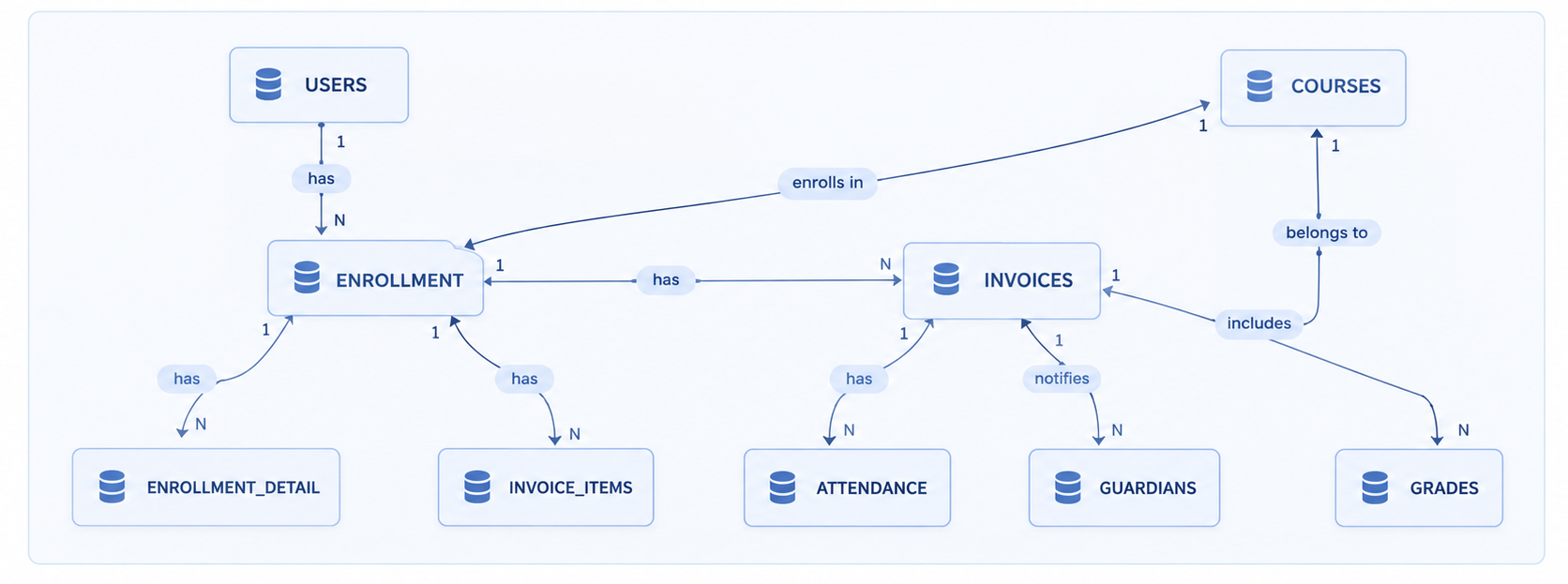
The relationships are what make the system useful. A student_id ties an attendance record to a profile. A section_id ties a grade to a class. The same logic applies whether the system is a classroom project or a platform serving tens of thousands of students. What changes at scale is normalization, indexing, access control, auditing, and automation.
Questions to ask a vendor about the data layer
- Is the data normalized? Duplicate student records across modules are the main reason a school ends up with several "true" versions of one student.
- Is there a documented API? You will want your LMS, accounting software, and identity provider to read and write the same data.
- Can you export everything? You should be able to take a full export that preserves relationships, not only flat spreadsheets.
- How are changes tracked? Audit logs matter for grades, fees, and personal data.
Student management systems for colleges and universities
Higher education has needs that a typical school system does not cover well. If you run a college, university, or postsecondary institution, check these specifically:
- Course registration and credit management: prerequisites, capacity limits, waitlists, credit hours
- Academic records and transcripts: grade points, repeats, official transcripts, graduation checks
- Degree and program progress: requirements, advising notes, progress toward completion
- Financial aid and student accounts: scholarships, sponsorships, ledgers, refunds
- Multi-campus and multi-faculty structure: separate rules per faculty with shared central records
- Student self-service: registration, results, statements, and requests without visiting an office
- Integration with LMS, library, housing, and identity systems
- Reporting for accreditation and regulators
Many universities use a dedicated student system alongside a wider campus ERP. If your scope includes finance, HR, and administration as well, see Clast for universities. Smaller colleges and vocational institutes often get what they need from a modern SMS with strong registration, assessment, and fee modules. See Clast for colleges.
Cloud-based vs on-premise
| Cloud-based (SaaS) | On-premise | |
|---|---|---|
| Hosting | Vendor hosts and maintains | Your servers and IT staff |
| Updates | Automatic | Scheduled by your team |
| Upfront cost | Lower | Higher (hardware, licenses) |
| Access | Any device with internet | Often limited to campus or VPN |
| Control | Less direct control over infrastructure | Full control, full responsibility |
| Typical fit | Most schools and colleges | Institutions with strict data-residency rules and strong IT teams |
For most institutions, a cloud-based student management system is the practical default. On-premise still makes sense where regulation or policy requires local data control. Whichever you pick, ask about backup, uptime commitments, and where data is stored. Our data security and system status pages show how we handle both.
Fee management deserves its own spotlight
Of all the features above, billing and fee management is often the one with the fastest, most measurable ROI. Manual invoicing is error-prone, slow, and staff-intensive. A dedicated fee management module automates the full cycle invoice generation, payment reminders, real-time collection dashboards and typically pays for itself within a single term through improved cash flow alone.
Who Needs a Student Management System and When
You don't need enterprise software to run a 30-student after-school programme. But you probably need it sooner than you think.
Signs you've outgrown your current tools:
- Managing more than 50 students and still using spreadsheets for attendance or billing
- Staff regularly ask "which version of this spreadsheet is the right one?"
- Chasing late payments takes hours each month
- A simple progress report requires pulling data from three or more places
- New staff take weeks to figure out where information lives
- You're unsure whether your data handling meets GDPR/FERPA requirements
- Parents regularly call the office about things that should be self-service
Types of student management systems and examples
The market splits roughly into the groups below. Vendor names are examples of each category, not rankings or endorsements. Check current features and pricing directly with each vendor.
| Institution type | Priority features | What to avoid |
|---|---|---|
| Independent / private K-12 | Billing & fee management, parent portal, enrollment workflows, reporting for governors | Systems built purely for state schools that lack flexible billing |
| State / public K-12 | Attendance (legally required), SEND tracking, safeguarding, MIS integrations | Platforms without compliance reporting for national standards |
| Childcare / nursery | Daily attendance, parent communication, billing, digital signing-in/out | Higher-ed focused platforms with unnecessary complexity |
| Higher education | Course registration, financial aid management, academic advising, multi-campus support. See our dedicated guide to ERP for colleges and universities. | K-12 tools that lack credit hour management and financial aid module |
| Multi-academy trust / chain | Cross-campus reporting, centralised governance, trust-wide analytics. The top school ERP systems of 2026 all support multi-site deployments. | Single-school systems that don't aggregate data across sites |
Where Clast fits: Clast is an all-in-one education management platform for schools, language academies, colleges, and universities. It brings together student and staff administration, attendance, assessments, institutional communication, task and workflow management, and performance analytics. It suits institutions that want these functions in one platform rather than several connected tools. If you only need a basic register or a standalone LMS, a lighter tool may be enough. You can try the live demo or review the product overview.
What "best student management system" really depends on
There is no single best system, only the best fit. The factors that change the answer most:
- Institution type and size: a nursery, a 600-student school, and a university need different depth
- Country and regulation: reporting formats, grading systems, and privacy laws differ
- Billing complexity: installments, scholarships, and multiple fee structures
- IT capacity: whether you can run and secure your own system
- Existing tools: the LMS, accounting software, and identity system you must connect to
The 2026 Market at a Glance
Market research firms don't agree on an exact number estimates for the global student information / student management system market in 2026 range roughly from $8 billion to $21 billion, depending on scope and methodology but they agree on direction: double-digit annual growth (most estimates cluster around 13–16% CAGR) through the early 2030s, driven by cloud migration, AI-based analytics, and mobile-first deployment becoming the default rather than a premium add-on. That growth is a useful sanity check for buyers: this is not a stagnant category, and a platform that hasn't shipped meaningful AI or mobile capability in the last two years is falling behind its peers, not just being conservative.
How to Choose the Right Student Management System
The SMS market is crowded dozens of vendors, overlapping feature sets, and sales teams skilled at making every platform sound ideal for your situation. Here's a practical framework.
- Map your real pain points first. Before looking at any vendor, write down the three to five administrative tasks that waste the most time or cause the most errors. "Billing is slow" is too vague; "we manually generate 400 invoices per term and 20% are late because parents don't know how to pay" is actionable.
- Separate must-haves from nice-to-haves. Must-haves are features without which the system doesn't solve your problem. This prevents impressive demos from swaying you toward features you'll never use.
- Shortlist based on institution fit. A platform built for 50,000-student universities is probably wrong for a 300-student prep school. Filter by institution type and size first.
- Test with real scenarios, not canned demos. Ask vendors to walk through your workflows: "Show me how a parent pays a tuition invoice through the portal." If they can't do it live, that's information.
- Interrogate the support model. What happens at 4pm on a Thursday when a parent can't access their account? Phone support? Live chat? Typical response time?
- Calculate total cost of ownership. Headline pricing often hides implementation fees, data migration costs, per-module add-ons, and price escalation after year one. Ask for a full three-year cost projection in writing.
- Talk to existing customers, not vendor-picked references. Find the platform's user community and ask openly about implementation pain points and whether they'd choose the same platform again.
Red flags to watch for during evaluation
Pricing only available after a "discovery call" if a vendor won't publish even indicative pricing, be cautious. It often means pricing is variable and optimised for what the market will bear, not what the product is worth.
Data export is complicated or costly — you should be able to export your data cleanly at any time. If a vendor makes this difficult, they're creating lock-in by design.
The demo looks polished but basic tasks are clunky — sales demos show the best 10% of the product. Ask to see the admin workflows a school secretary would use every day, not the executive dashboard.
What Does a Student Management System Cost?
Pricing varies enormously depending on institution size, which modules you need, and whether you're buying a SaaS subscription or a self-hosted licence. Here's a realistic breakdown:
| Tier | Typical annual cost | Best for |
|---|---|---|
| Free / open source | $0 (but staff time & hosting costs) | Very small organisations with technical staff |
| SMB SaaS | $2,000 – $15,000/yr | Private K-12, childcare centres, small colleges (50–500 students) |
| Mid-market SaaS | $15,000 – $60,000/yr | Growing independent schools, multi-site operators, community colleges |
| Enterprise | $60,000 – $500,000+/yr | Large universities, state school networks, multi-academy trusts |
Costs people forget to budget for
- Data migration: cleaning and importing historical records
- Implementation and setup: configuration, grading scales, fee structures
- Training: staff time as well as vendor fees
- Integrations: accounting, payroll, identity, LMS
- Support tiers: priority or phone support may cost extra
- Renewal increases: ask for a cap in the contract
A simple ROI check: multiply the monthly admin hours the system should save by the fully loaded hourly cost of the staff doing that work, then compare the result to the monthly subscription. Treat faster fee collection and fewer errors as upside, not as the justification.
Implementation What to Expect
The single biggest cause of SMS project failure isn't the software it's the implementation. A great platform poorly configured and under-trained will underperform a decent platform rolled out thoughtfully.
For a small-to-medium school, expect 6–16 weeks from contract signing to go-live. Larger institutions with complex migrations and multiple campuses can take 6–12 months.
| Phase | Duration | What happens |
|---|---|---|
| Discovery & setup | 1–3 weeks | Vendor configures your account, modules, and permission levels. You provide your branding, grading scales, fee structures. |
| Data migration | 2–4 weeks | Existing student records imported, cleaned, and verified. This phase is often harder than expected. |
| Staff training | 1–2 weeks | Role-based training sessions. Admins, teachers, and finance staff all need different depth of training. |
| Parallel running | 2–4 weeks | Running old and new systems simultaneously to catch errors. Uncomfortable but worth it. |
| Go-live | Ongoing | Old system retired. Expect intensive vendor support for the first 4–6 weeks. |
Timelines depend on data quality and institution size. Small schools may be live within weeks. Large, multi-campus institutions can need many months.
Student data migration checklist
- Remove duplicate student records before importing
- Standardize name, date, and phone formats
- Decide how many years of history to bring across
- Map old fields to new fields in a written document
- Test with a small sample, then a full trial import
- Have staff verify a random sample of migrated records
- Keep the old system read-only for a defined period
Avoiding common mistakes
- Name an internal project owner with time and authority to make decisions
- Explain the "why" to staff early so the change does not feel imposed
- Avoid launching in the busiest week, such as the start of term
- Report problems immediately during the pilot, because workarounds become habits
- Plan ongoing training for new staff and new features
Security, privacy, and compliance
Student records include sensitive personal data, often about minors. Ask every vendor:
- Which regulations does the system support (for example FERPA in the US, GDPR in the EU and UK, or local data-protection law)?
- Is data encrypted in transit and at rest?
- Are permissions role-based, and can they be limited by campus, class, or record type?
- Are access and changes logged?
- Where is data stored, and can you choose the region?
- What happens to your data if you leave?
This list is a starting point, not legal advice. Confirm your own obligations with your compliance lead or counsel.
How to avoid the most common implementation mistakes
- Clean your data before migrating it. Garbage in, garbage out. Spend time removing duplicate records, standardising name formats, and verifying contact details before the migration begins.
- Nominate an internal project champion. The vendor can guide you, but you need an internal person with enough seniority and time to drive adoption. This is usually a school business manager or deputy head.
- Over-communicate with staff. Change is uncomfortable. Staff who don't understand why the system is changing will resist it. Give people enough context about what's changing, when, and why.
- Don't try to go live before term starts. Implementing a major new system in the week before a new school year opens is a recipe for chaos. Build in buffer time.
- Use the pilot period honestly. If something doesn't work the way you need it to, raise it immediately rather than finding a workaround. Workarounds harden into permanent habits.
Conclusion
A student management system isn't a magic fix. It won't teach better lessons, resolve staffing challenges, or boost morale on its own. What it does is remove the administrative friction that stops good educators from focusing on students, and gives school leaders the data they need to make genuinely informed decisions.
The institutions that get the most out of their SMS share a few habits: they identify clear pain points before choosing a platform, they involve admin staff not just leadership in the selection process, they invest in proper training, and they treat implementation as a change-management project rather than a software installation.
Done well, switching to the right student management system is one of the highest-ROI investments a school can make not because the software is expensive, but because the alternative (manual processes, fragmented data, chasing payments by hand) is already costing more than most institutions realize. If you're ready to explore what a modern platform looks like in practice, our overview of how Clast transforms educational management is a good next step.